Note: GenAI (Gemini-Pro) was only used to generate the diagrams, not the content.
Background
DynamoDB streams provide a means to consume item level creation/updates/deletion events in-order (similar to a Write Ahead Log) on a DynamoDB table. The streams can be used to solve for use cases involving triggering second order effects on DDB table updates.
AWS Lambda functions provide a managed subscription to consume DynamoDB streams, handling the polling, retry handling and auto-scaling.
The DynamoDB stream → Lambda consumption is a very common setup with lambda acting as either as a processing step doing event filtering/enrichment/transformation in pipelines before invoking a downstream system or acting as the final sink.
How DDB Streams and Lambda Consumers Work
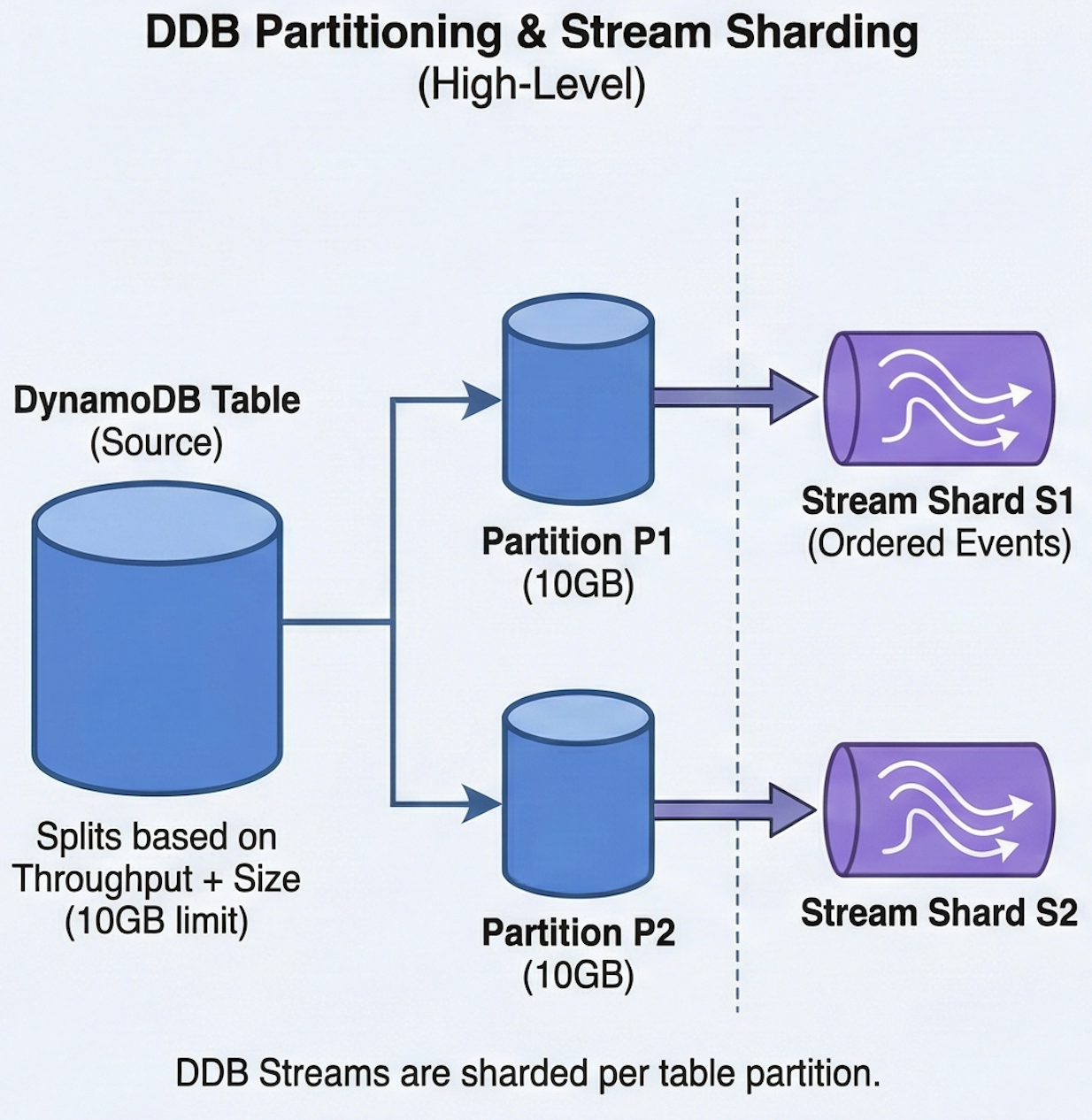
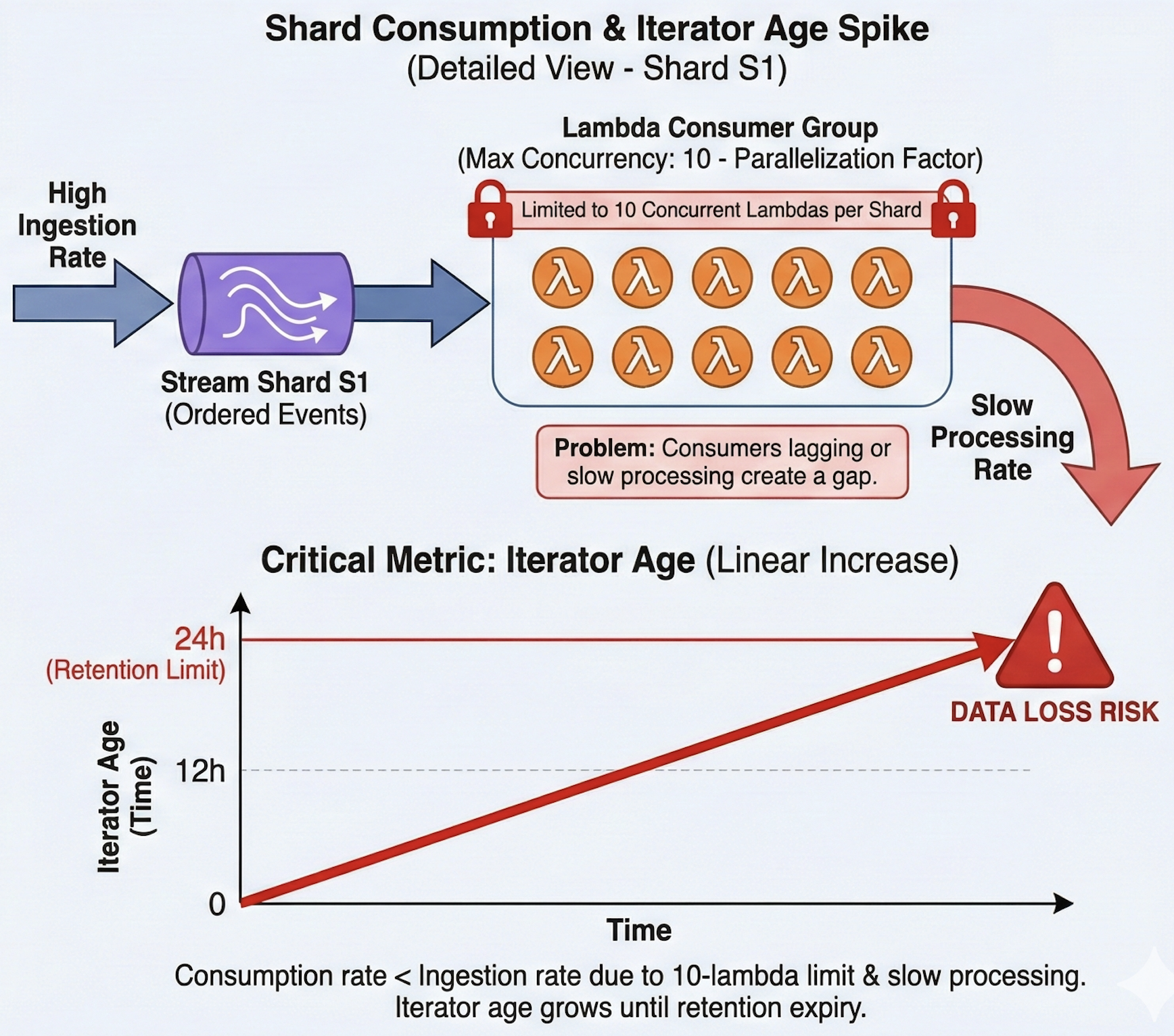
DDB streams are sharded per table partition. DDB splits storage partitions for a table based on configured read/write throughput + partition size (10GB by default). DDB streams guarantee shard level in-order processing of the events which implies that the max concurrent lambdas that can poll from a single shard is limited at 10 (called parallelization factor https://docs.aws.amazon.com/lambda/latest/dg/with-ddb.html)
This creates a gap between ingestion rate and processing rate; if a particular set of lambda consumers (max 10 concurrent) consuming from a stream shard starts lagging or start taking abnormal processing times, it is possible that the consumption falls behind the ingestion; ultimately spiking up the iterator age metric.
If the particular stream shard was already being processed by 10 concurrent lambdas, it is not possible to speed up the processing rate further (unless lambdas themselves start processing the events faster), ultimately ending up in a situation where the iterator age metric increases linearly and hits the 24 hours event retention limit.
Use Case
Recently at work, we had a use case which involved consumption of a DynamoDB stream by a lambda. The DDB had a write traffic of 5k TPS and a read traffic of 15k TPS. High write traffic implied that the partitions would be split frequently as and when they hit either the RCU/WCU throughput limit or the 10GB storage limit.
This indeed was the case with partition splits happening every 30 mins (a single partition was hitting the 10GB limit and then getting split). The stream consumer lambda function was doing an API call to a downstream service and making a database (DynamoDB) read.
We configured our lambda consumer with:
- 100 messages per batch
- Parallelization factor of 10 (max 10 concurrent lambdas per stream shard)
- 3 retries with bisection of the batch on failure enabled
Observations from Scale
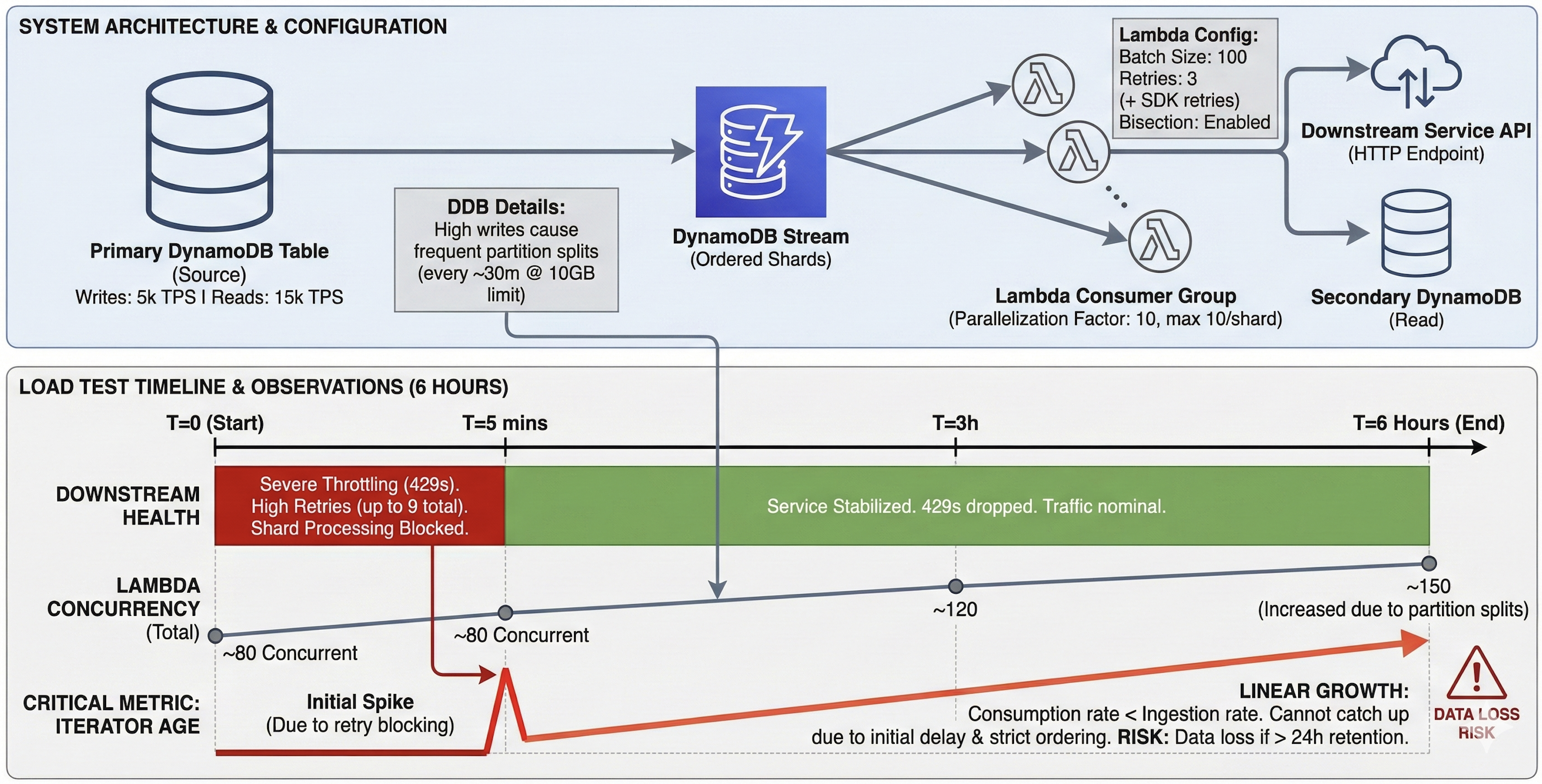
While performing the load tests on above setup for around 6 hours, we observed that around 80 concurrent lambdas processed the events in first hour, which increased to 120 and subsequently 150 at the end of load test. We also observed that the iterator age metric of the lambda consumer started increasing linearly just a few mins after the load test was started and continued upwards for the duration of test.
On investigation, we found out that the downstream service which our lambda function was making an API call to throttled heavily during the start of the load test and the 429 errors were retried by the lambda first and then the DDB stream subscription 3 more times, resulting in 9 retries overall.
This lasted for around 5 mins before the traffic became stable and the 429 errors dropped. However, this resulted in lambda consumption falling behind the stream due to in-order processing of the messages. The consumption rate was not able to catchup with ingestion rate and the iterator age metric started going up.
⚠️ In production, this could result in data loss if the iterator age metric goes beyond 24 hours (DDB stream event retention time limit).
Learnings
This should not be considered as an exhaustive list of recommendations and each of them might not be applicable to a specific use case; these are the findings we observed from our use case.
1) Keep Stream Processing Fast and Minimal
The stream ingestion and immediate processing by lambda consumers are tightly coupled due to in-order processing of the messages (new messages in a stream shard are not picked until a batch is processed).
If possible, we should look for ways to drain the stream faster and process later if in-order processing of the events is not required. This can also be achieved by introducing SQS queues in between to act as a buffer.
If a direct lambda consumer must be used, it is advisable to keep stream consumer lambda function lightweight with minimal downstream call graph to avoid the chances of a poison pill effect. Adopt fail fast strategy and bisect the batch on failures to prevent stalling or retry loops. Retry loops can lead to starvation of primary messages and increase in iterator age metric over time.
2) Separate Process for Retrying Failed Messages
The event stream messages that fail should be independently redriven outside the primary lambda function which handles stream messages to avoid starvation of stream processing.
A common pattern used is to put the failed messages into a Dead Letter Queue (DLQ) and have a separate lambda function which reads from DLQ and processes the messages.
3) Leverage Subscription Filters Early
DDB stream subscription with the lambda functions provides a means to add event filters, which can be defined using EventBridge event filter patterns. The subscription drops the events if they do not meet the filter criteria without invoking the lambda function.
Leverage this instead of consuming them in the lambda function and then dropping (consider an if-else condition).
4) Disaster Recovery
If the processing part of the setup (lambda and any downstream systems) face a downtime, the iterator age metric will shoot up if every message gets retried x number of times (which you configured on the subscription), leading to 3x additional load on the consumption, which lambda might not scale up and can lead to increase in iterator age metric.
For disaster recovery, have a setup to drain the DDB stream into a buffer (an SQS queue can help) to prevent the data loss beyond 24hrs.
If you have had similar or different observations with DDB streams and lambda functions, do reach out. I’d be happy to discuss, learn and apply!